DisplayFusion ist Á¤hnlich dem schon von mir vorgestellten Tool UltraMon™ - nur mit ein paar neuen Funktionen. Hat man mehr als ein Bildschirm bietet das Tool viele nette Funktionen, wie UltraMon ist das Tool jedoch nicht kostenlos.
- Advanced Multi-Monitor Taskbar support
- Use a different desktop wallpaper image on each monitor
- Use a desktop wallpaper image that spans all monitors
- Randomly change your desktop wallpaper using local images or images from Flickr
- Drag or middle-click the taskbar of maximized windows to move them to other screens
- Auto-snap windows to the edge of your monitor
- Integrated Flickr.com image search & download
- Integrated Vladstudio.com image search & download
- Window TitleBar Buttons to move/size/control windows
- Manage application windows with fully customizable hotkeys:
Move windows to the next monitor - Move windows to the next monitor and maximize them
- Move windows to the centre, top, bottom, left or right side of the monitor
- Size windows to a configured size or percent of the work area
- Maximize windows so that they span all monitors
- Customize your own hotkeys to do anything you can imagine
Es gibt zwar eine kostenlose Version, jedoch fehlen in dieser Version genau die Funktionen die sehr interessant sind.
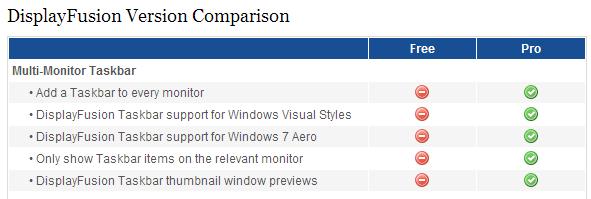
[nggallery id=132]
Download: [download id="294"]
Webseite: binaryfortress.com/displayfusion/
Alternativen sind mir (außer UltraMon™ ) keine bekannt.
No comments yet